 Print Deck
; Print Deck 3.0 · the dashboard for your whole print room
Every printer on one screen. And it talks back.
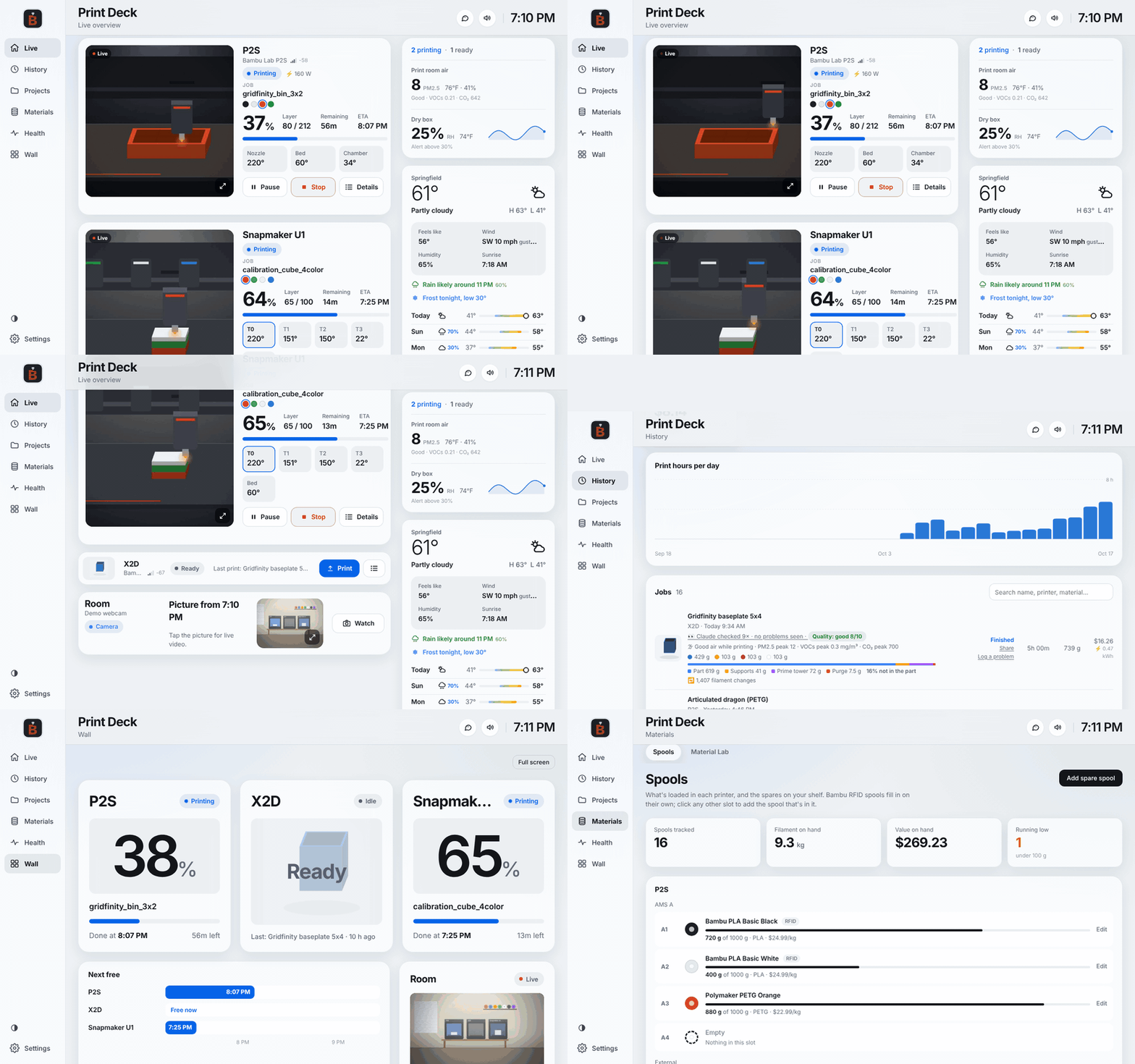
Print Deck runs your print room from a Raspberry Pi. It watches every camera for failures, tells you out loud when a print is done, greets you by name when you walk in, and keeps the books on every gram of filament, right down to the quote you send a customer.
Launching soon · Free for personal use · Pay what you want · Raspberry Pi, Mac, Windows or Docker
; FEATURE: highlights
The things no other dashboard does
Progress bars are easy. Print Deck is built for the moments that actually matter in a print room.
; FEATURE: failure watch
It catches spaghetti before you waste the night
Claude looks at each camera every few minutes while a print runs, next to a frame from earlier so growth stands out. Anything flagged gets a second look from a sharper model, and before an alert goes out a third one reviews all the frames.
- No false alarms every hour. Shadows and supports get cleared before they reach your phone.
- You see the whole chain on every print: who flagged what, and why.
- Plate check before a print, so you never print on yesterday's part. Quality grade after.
The dark patch under the nozzle is a shadow from the toolhead; the part is unchanged.
The tangle behind the tail has grown since the last check and the tail is no longer on the plate.
; FEATURE: voice
It talks, through the room speaker or your Sonos
A chime and a spoken line when a print finishes, fails or needs you. Music on your Sonos pauses for the line and picks right back up.
- Four personalities from Polite to Unfiltered.
- Natural ElevenLabs voices that actually sigh and laugh, or a free offline voice.
- "Hey Deck": ask how long is left, what's loaded, or how much filament a print used.
- Say anything: type a line and it plays in any room. Dinner's ready.
; FEATURE: people
It knows who walked in, and what they missed
Face recognition on a cheap USB webcam, running entirely on the Pi. Each person gets greeted in their own style, with what finished, what failed and who came by while they were out.
- Fingerprints only, never photos. Only people you enroll.
- Wakes the touchscreen when someone comes in, and ignores printers moving behind their windows.
; FEATURE: reels and sharing
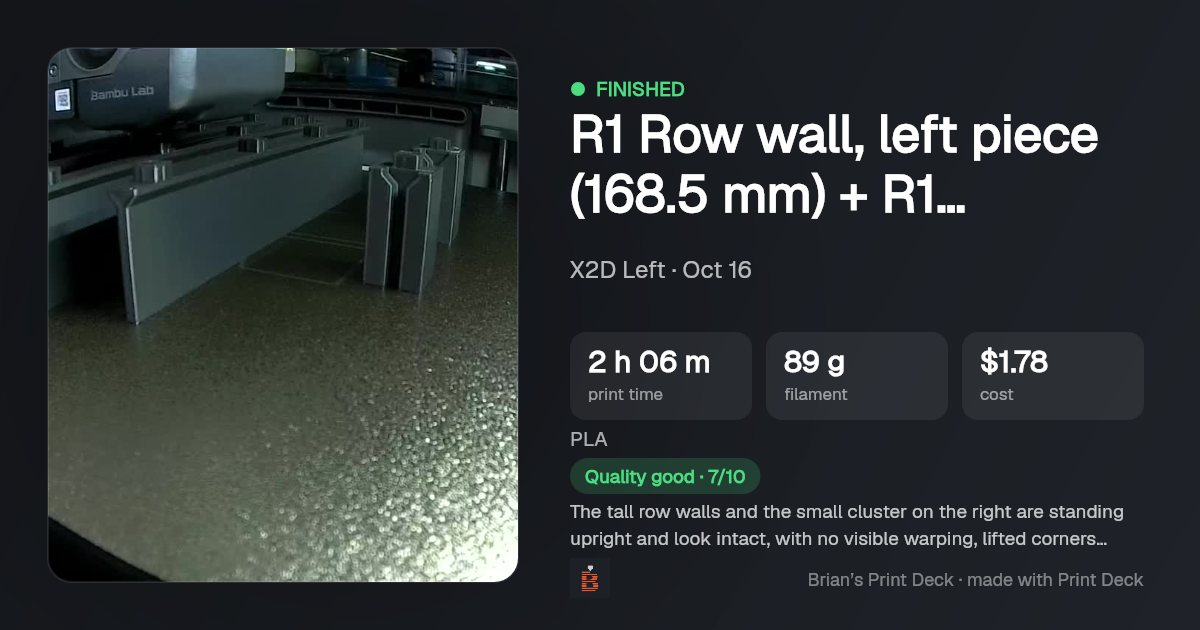
Highlight reels and share cards, made for you
A narrated 40-second video of your day's or week's prints, built from the camera time-lapses, with captions so it works on mute. Tall for TikTok, Reels and Shorts, wide for everything else.
- Automatic every week if you like.
- One-tap share cards for any print: photo, time, filament, cost and Claude's grade, ready for Discord or Reddit.
; FEATURE: print shop
Selling prints? It runs the business side too
Etsy shop, side hustle or a full print farm: the numbers you'd normally keep in a spreadsheet are already here, worked out from what your printers actually did.
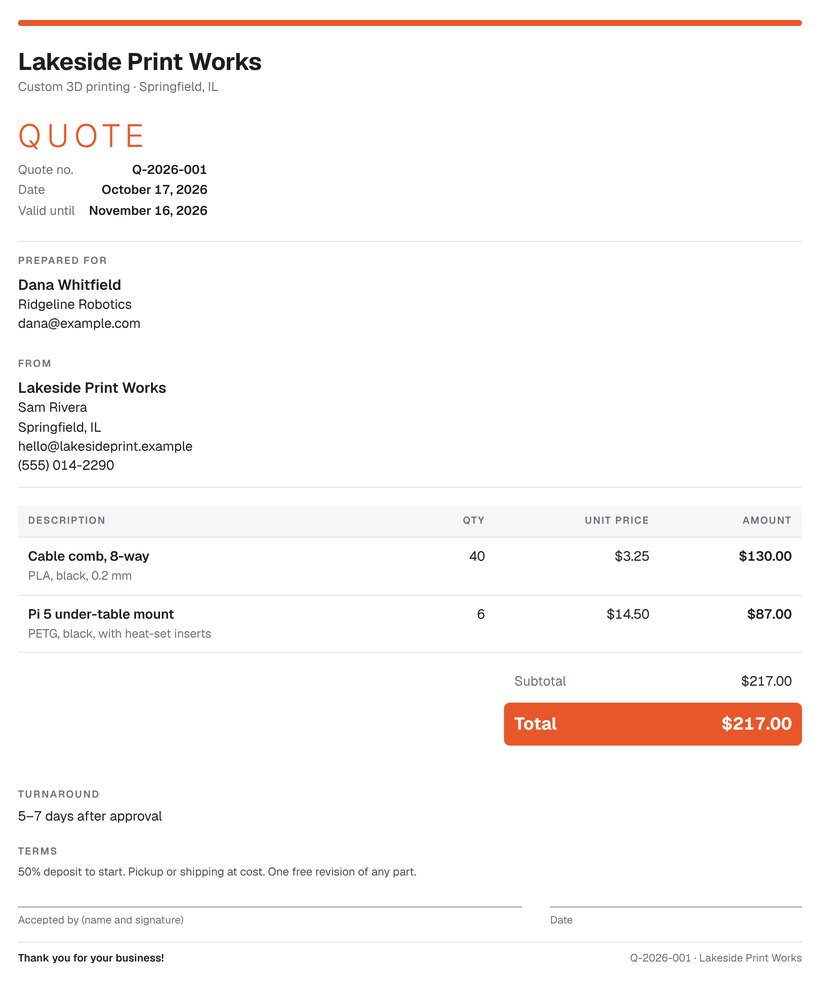
Quotes that know what a print really costs
- The real cost, not a guess: filament from your spool prices, electricity from your smart plugs, wear on the machine, your hands-on time, and a failure allowance from your actual failure rate.
- Quote from anything: drop in sliced .3mf or G-code files (several at once), pick a past print or a whole project, or just type hours and grams.
- Numbered, branded PDF quotes with your logo, terms, turnaround and a signature line, emailed straight from the deck.
- Track every quote from sent to accepted, revise without losing the original, and keep an internal copy with your cost and margin.
- Accepted? One tap turns the quote into a production project with the quantities, materials and due date.
- Projects add up every part, revision and test print with photos and what the whole job really cost.
; QUOTE ENGINE · 12 gridfinity bins
OEE for your print farm
The same number factories run on: availability × performance × quality, per printer, against the hours your shop is open. Plus TEEP for every hour of the week.
- Where the hours went: printing, idle, needs attention, offline, and the one that stings, waiting on you: finished prints sitting on the plate.
- When the farm prints: a heat map by hour and day, and the quietest overnight slot for long prints.
- Per-printer performance, success rates, filament and power, with a CSV export.
- The Sunday report sums up the week, OEE included, on your phone.
; INSIGHTS · this week · example
OEE on the right. The U1 sat finished for 18% of shop hours this week: that's the time a quicker plate swap would win back.
; FEATURE: everything else
And the rest of the print room
The everyday things, done properly.
One screen, every printer
- Live camera, progress, layer, time left and finish time
- Every temperature: both X2D nozzles, all four U1 toolheads
- What's loaded in every AMS slot
- Pause, Resume, Stop, and send a .3mf straight to a Bambu with plate and AMS slot mapping
- A TV Wall view with a "when is each printer free" timeline
- A touchscreen mode that sleeps on its own and wakes when someone walks in, plus a phone layout
Spools and materials
- Filament per print split into part, supports, prime tower and purge, plus tool and color changes
- Spools with Bambu and Snapmaker RFID; notices when you swap a roll, even a non-RFID one
- Grams left on every spool, low-spool warnings and cost per print from what you paid
- Material Lab: drying, temperatures and per-printer flow and K values, next to how each material has actually printed
Ask your own history
- Print Detective keeps every failure as a case with the last ten minutes of camera frames
- Spots patterns: a material, plate or printer that fails more than the rest
- Ask the Detective: "why does PETG keep lifting on the left printer?" It remembers what you tell it about your setup
- Quality reports grade each finish against earlier prints of the same model
- Ask Print Deck anything quick: "how much filament did the helmet use?"
The room itself
- Air quality: PM2.5, VOCs, formaldehyde and CO₂, logged with every print
- Humidity for the bench and dry boxes, with alerts
- Real power per printer from smart plugs, and cost per print
- Status lights: a progress bar per printer, green when done, red when it needs you
- Weather with a frost warning for tonight
Healthy printers
- Spots changes, not just intervals: repeat error codes, slower heat-ups, rising failures
- Bambu HMS codes in plain English
- Maintenance by print hours, days or grams of abrasive filament
- Network health: signal, drops and response time for every printer
Home Assistant and your phone
- Every printer and sensor as a Home Assistant device, no YAML
- Print events for automations
- Push alerts by ntfy (or iMessage on a Mac), with the photo and a Pause button
- A morning briefing and a Sunday report, in the same personality as the voice
- An MCP server so Claude Desktop can ask your deck questions
All 64 features, in one listfor the spec-sheet readers
Printers
- Bambu Lab over the local network (MQTT, FTPS, camera)
- Snapmaker U1 and any Klipper/Moonraker printer
- Finds printers on your network by itself
- Live camera, progress, layer, ETA, every temperature
- AMS slots with color and material
- Pause, Resume, Stop
- Send .3mf to Bambu with plate and slot mapping
- Bambu HMS error codes in plain English
- Raw printer data view for troubleshooting
Claude (optional)
- Failure watch with Haiku → Sonnet → Opus escalation
- Plate check before a print starts
- Quality grade after every print
- Print Detective cases with 10 minutes of frames
- Ask the Detective, with memory of your setup
- Welcome-back greetings per person
- Narrated highlight reels
- Monthly budget cap you set
Voice
- Chime and spoken line on finish, fail, pause
- Four personalities, Polite to Unfiltered
- ElevenLabs voices that laugh and sigh, or offline Piper
- "Hey Deck" questions out loud
- Sonos around the house; music resumes after
- Bluetooth speaker pairing from the touchscreen
- Say anything, in any room
Business
- Quote Engine: true cost and price
- Quote from sliced files, past prints, projects
- Numbered, branded PDF quotes with terms
- Email quotes from the deck
- Sent / accepted tracking, revisions, internal margin copy
- Convert a quote into a production project
- Projects with totals, photos and true cost
- OEE, TEEP and where the hours went
- Farm heat map, CSV export
History and materials
- Every print with photo, time, grams and cost
- Part / supports / tower / purge split, tool changes
- Spool inventory with RFID sync and swap detection
- Material Lab profiles per printer
- Share cards for any print
- Time-lapse based highlight reels
Health and maintenance
- Recurring errors, wandering temps, slower heat-ups
- Rising failure rates flagged
- Maintenance by hours, days or abrasive grams
- Network health: signal, drops, response time
- The Pi's own Wi-Fi watched and explained
The room
- Room camera on Live and the Wall
- Face recognition on the device, fingerprints only
- Screen wakes on motion, ignores moving printers
- Air quality from a Panda Sense Pro
- Govee humidity sensors and dry-box alerts
- Shelly plugs for real power (read-only)
- WLED and Govee status lights
- Weather ticker with frost warnings
Alerts and integrations
- ntfy push with photo and Pause button
- iMessage and Mac notifications
- Morning briefing and Sunday report
- Home Assistant devices and print events
- MCP server for Claude Desktop
Setup and care
- Raspberry Pi, Mac, Windows or Docker
- First-run setup in a few taps
- Demo mode to try it with no printers
- Signed updates that install when nothing's printing
- One-click backup and move to a new device
- Passcode sign-in for phones; no account, no cloud
- Wall view, touchscreen mode and phone layout
; FEATURE: hardware
Plays well with what's already in your room
All optional. Plug in what you have, skip what you don't.
; FEATURE: privacy
Your print room stays yours
No account, no subscription, no cloud of ours. Everything lives on the Pi in your house.
- Your data stays home. Print history, photos and settings never leave your device.
- AI is optional. Camera frames go to Anthropic only for the Claude features you switch on, with your own key. Everything else works offline.
- No port-forwarding. Use Tailscale to check in from anywhere.
- A passcode so phones sign in once. The deck's own screen never asks.
- Signed updates that install themselves when nothing is printing, and one-click backups.
; FEATURE: download
Get Print Deck
Launching soon. Leave your email and you'll hear the day it's out. Free for personal use. If it saves you a failed print, chip in what it's worth to you.
; PERSONAL USE
$0+ pay what you want
Every feature, every update. Enter $0 to download free, or tip to support the next printers on the list.
Download Print Deck- Raspberry Pi 5: flash Raspberry Pi OS Lite (64-bit), then run the one-line installer from your download.
- Mac or Windows: run the installer. It starts in the background and opens in your browser.
- Docker:
docker compose up -d
The setup finds your printers on the network. Bambu printers need their LAN access code; Pause and Stop need LAN Only with Developer Mode.
; COMMERCIAL USE
Print farms and shops
Printing for money? Etsy shop, print farm, makerspace or a business? A commercial license covers it and keeps Print Deck going. Quotes, projects and OEE are built in.
Get a commercial licenseSame software, same features. Personal use is always free.
; FEATURE: questions
Questions
Is it really free?
Yes, for personal use. Every feature is included. Pay what you want if you'd like to support it. Using it to make money (selling prints, a print farm, a business) needs a commercial license.
Do I need Claude or ElevenLabs?
No. Without them you still get every printer on one screen, history, spools, costs, sensors, lights, Home Assistant, alerts and an offline voice. Claude adds the failure watch, plate check, quality grades, greetings, reels and the Detective. ElevenLabs adds natural voices.
What does the AI cost to run?
You use your own Claude API key and set a monthly budget in Settings. The routine camera checks use the smallest model and cost a tiny fraction of a cent each; the sharper second looks and reviews only run when something is flagged. Deck stops using Claude for the month when your budget is reached.
Will it work with my printer?
Bambu Lab (X2D, H2D, P2S, X1, P1, A1) and the Snapmaker U1 or any Klipper printer with Moonraker work today. Prusa, OctoPrint, Creality and Elegoo are coming in 3.1. If yours isn't on the list, say which one.
Does a Bambu printer need Developer Mode?
Only for control. Print Deck shows everything with the printer in normal cloud mode. Pause, Stop and sending prints need LAN Only Mode with Developer Mode turned on, which turns off Bambu's cloud printing.
Where does my data go?
It stays on your device. Camera frames go to Anthropic only for the Claude features you switch on, and spoken lines to ElevenLabs only if you choose one of their voices. Your keys are stored on the device and never sent to a browser.
What do I need to run it?
A Raspberry Pi 5 is the recommended setup, ideally with a touchscreen in the print room. It also runs on a Mac, a Windows PC or in Docker, with every printer, AI, Sonos, quote and history feature. The room extras that plug into the Pi itself (the room camera and face greetings, a speaker in the room, Bluetooth humidity sensors and the touchscreen mode) need the Pi.